Compare Learning Curves
Assumptions
- Predefined Dataset Split: A train/test split has already been performed, and the focus is on analyzing the training dataset.
- Model and Metric: A single machine learning model and performance metric (e.g., accuracy, RMSE, F1 score) have been chosen for evaluation.
- Learning Curve Analysis: The procedure assumes the goal is to evaluate performance trends as the training set size varies.
Procedure
-
Prepare Training Subsets
- What to do: Create subsets of the training dataset with varying sizes (e.g., 10%, 20%, 50%, 100% of the data).
- Why: To observe how model performance changes as the training dataset grows.
-
Perform K-Fold Cross-Validation
- What to do: For each subset, use k-fold cross-validation to evaluate the model.
- Record the train and validation performance metrics for each fold.
- Why: To ensure reliable estimates of performance for each training size.
- What to do: For each subset, use k-fold cross-validation to evaluate the model.
-
Calculate Average Scores
- What to do: Compute the average train and validation scores for each training set size.
- Why: Summarize the performance trends across folds.
-
Plot Learning Curves
- What to do: Plot a validation curve with:
- X-axis: Training set size.
- Y-axis: Train and validation performance scores.
- Why: To visualize performance trends and diagnose potential overfitting or underfitting.
- What to do: Plot a validation curve with:
-
Analyze Trends
- What to do: Look for key patterns in the learning curve:
- Does performance improve with more data?
- Is there a significant gap between train and validation scores?
- Why: To identify signs of overfitting, underfitting, or appropriate model scaling.
- What to do: Look for key patterns in the learning curve:
Interpretation
Outcome
- Results Provided:
- A learning curve plot showing train and validation performance against training set size.
- Quantitative insights into how the model scales with more data.
Healthy/Problematic
- Healthy Trends:
- Validation performance improves as training set size increases and stabilizes near train performance, indicating the model generalizes well.
- A small, narrowing gap between train and validation performance scores as training size increases is expected.
- Problematic Trends:
- Overfitting: A large gap where train performance is high, but validation performance remains low, even with larger datasets.
- Underfitting: Both train and validation performance scores remain low and do not improve significantly with more data.
- Data Issues: Performance does not improve with larger data sizes, suggesting poor data quality or an inappropriate model choice.
Limitations
- Computational Costs: Performing k-fold cross-validation for multiple training set sizes can be time-intensive for large datasets.
- Data Availability: Results may not be meaningful for datasets with insufficient data for incremental subsets.
- Single Metric Focus: Analysis is limited to the chosen performance metric; using multiple metrics may provide a more comprehensive evaluation.
- Simplistic Analysis: Does not account for other factors like feature importance, model complexity, or hyperparameter tuning.
Code Example
This example demonstrates how to use LearningCurveDisplay.from_estimator to automatically calculate and plot a learning curve for a regression task, detecting overfitting or underfitting patterns.
import matplotlib.pyplot as plt
import numpy as np
from sklearn.datasets import make_regression
from sklearn.tree import DecisionTreeRegressor
from sklearn.model_selection import LearningCurveDisplay

# Generate synthetic regression data
X, y = make_regression(n_samples=300, n_features=5, noise=0.1, random_state=42)

# Define a model
model = DecisionTreeRegressor(max_depth=3)

# Plot learning curve using LearningCurveDisplay
disp = LearningCurveDisplay.from_estimator(
    model,
    X,
    y,
    train_sizes=np.linspace(0.1, 1.0, 50),
    cv=10,
    scoring="neg_mean_squared_error",
    score_type="both",
    score_name="Mean Squared Error",
)
disp.ax_.set_title("Learning Curve for Decision Tree Regressor")
disp.ax_.set_xlabel("Training Set Size")
disp.ax_.set_ylabel("Negative Mean Squared Error")
plt.grid(True)
plt.show()
Example Output
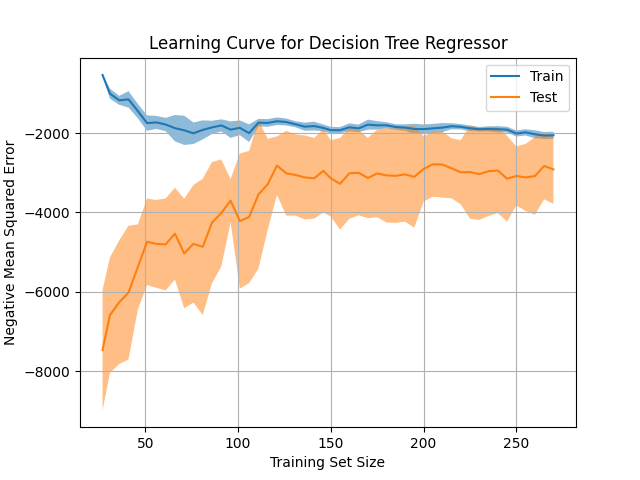
Key Features
- Uses
LearningCurveDisplay.from_estimator: Automates the calculation and visualization of learning curves with minimal code. - Variable-Capacity Model: Demonstrates potential overfitting patterns using a model with variable capacity (e.g.,
DecisionTreeRegressorwithmax_depth). - Cross-Validation Built-In: Efficiently calculates learning curves using k-fold cross-validation.
- Automatic Visualization: Provides a clear, annotated plot for both train and validation performance metrics.
- Customizable Configuration: Supports various model types, training sizes, metrics, and cross-validation settings.
- Simplified Workflow: Eliminates the need for manual calculations or separate plot construction, focusing on rapid diagnostics.